Technical Communicators,
Windows NT and Unix/Linux
| Thomas Albert UC Berkeley Extension Instructor of Technical Communication http://www.WORDesign.com |
Becky Phung Computer Resource Specialist MIS Consultant |
| The authors presented a version of this presentation to the Silicon Valley Chapter of the Society of Technical Communication on July 22, 1999 | Copyright © 1999 Thomas Albert and Becky Phung All rights reserved Contact talbert@WORDesign.com to obtain information |
A computer operating system is analogous to a human being's central nervous system. Just as our nervous systems links our with our physical hardware, including our peripheral devices (extremities, such as hands and feet)
Central Nervous System |
Computer Operating System |
Transparently links conscious, intentional mental activity
with our physical hardware (organs) through various means, depending on
the circumstances:
|
Transparently links users (human beings and applications)
with
|
Transparently links conscious,
intentional mental activity with
|
Transparently links users (human
beings and applications) with each other through:
|
Conscious mental activity is our perhaps analogous to outer
"shell", our "personality" or explicit persona.
The unconscious nervous system activity is perhaps analogous to our "kernel",
the internal "processes" that manage the bulk of our involuntary (and
unconscious) operations: monitoring our environment, releasing adrenaline when
we sense danger, becoming hungry when our blood sugar is below a certain
threshold, blocking out signals that cause us pain or threaten us (psychological
defenses).
VISIBLE |
INVISIBLE |
| Phenomena of which we are conscious, aware, cognizant, and can explicitly discuss; things we decide to do as deliberate agents | Most the operations of the central nervous system (things we do automatically), including management of the circulatory sub-system (heartbeat, artery constriction), the respiratory sub-system (breathing, mucus linings), the digestive system, the visual system (focusing the eye, constricting the pupil, blinking periodically), the reflexes, and even psychological defenses (the unconscious). |
| Example: We might close our eyes
and pause for a minute to try to remember what we had for breakfast two
days ago, and we might get an answer that we apply to our
"application", such as a conversation or decision-making
process.
We are only aware of our application: to remember something; to say or do something. |
Example: We are unaware of the chemical mechanics of how our brain stores, stores, and recalls data; we do not know the physical address of a given datum. We can infer that we need a minimum amount of sleep for our memory management operations to be efficient, but we are not conscious of how those unconscious hours (re)organize the files and directories (and database indexes) of our brain. |
|
API calls, processes, threads, memory management, file system management, security management |
|
API calls, processes, threads, memory management, file system management, security management |
What is an Operating System?
An operating system is software that enables
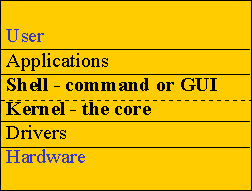
| APPLICATIONS: strictly speaking, the shell is an application, but above the shell are applications, such as compilers, text editors/word processors; electronic spreadsheets; and games. (A shell script, too, is an application that uses shell commands to make system calls that the kernel performs.) |
| KERNEL: schedules processes to enable multi-tasking; manages virtual memory (swapping from hard disk to RAM); manages the file system (enforcing file permissions and security); coordinates device input and output through the device drivers. ([Device drivers "map" specific hardware (such as Brand X mouse, printer, or network card), to the expectations of the operating system, which can "talk to" many types of devices and many brands of each type.] |
Technical Communicators
and the OS environment
use online Help
write online or paper documentation
Technical Communicators
use the Operating System shell to perform tasks
Windows NT Strengths
Windows 2000 (Windows NT 5.0)
Unix/Linux Strengths
Unix, an engineering legacy
kernel separate from shell
Unix Evolution
Proliferation of variants ("implementations" or "flavors")
Linux Strengths
Linux (Re)Sources
Demonstration of Tasks
Getting Help
Windows NT
Unix shell
Navigate the File System
Windows NT Explorer (can be a browser with "Back" button)
Unix shell
pwd (present working directory)
ls (list files/directories) -l -a switches
cd .. (change directory up a level)
Share Files
Windows NT Explorer
right-click folder, create "share" w/ options
Unix shell mode of access
chmod -R 777 my_directory
recursively grant read, write, and execute permissions to user, group, and others
chmod -R 750 my_directory
recursively grant full permissions to user, read/execute to group, and none to others
Print Files
Windows NT
print from the application (hidden API call)
Unix shell for line printer
lp my_file or lpd my_file
/etc/printcap is the printer configuration file
Monitor CPU Processes
Windows NT
Ctrl Alt Del > TaskManager
Unix shell to show "process status"
ps -a shows all terminal-related process IDs (PIDs)
top shows the most intensive processes (Linux)
Stop a Print Job
Windows NT
Ctrl Alt Del > TaskManager > End Task
Unix shell to "kill" a process
kill -9 process_id_of_job
Create and Edit Text Files
Windows NT Notepad
Unix vi command and insert modes
vi file_name starts vi
cursor: h left, j down, k up, l right
a append, i insert, x delete character
:wq write and quit; :q! quit and no save
Uncompress Files
Windows NT - use WinZip
Linux tar (tape archive)
tar -xvf tarfile.tar.gz extracts, verbose (print filenames during extraction), files from the named archive, then use gzip (GNU project) to uncompress
tar -cvf to create a new file archive in verbose mode
Summary
Copyright © 1999 Thomas Albert and Becky Phung
All rights reserved
Contact talbert@WORDesign.com to
obtain information